Note Chat
Meet Note Chat
Conversational AI for clinical note review. Ask questions in everyday language, search across a single note, a specific type of note, or a patient’s full note history, and get a concise, organized answer. Every answer links to the supporting text in the original documentation, so you can verify findings and explore the record in greater detail.
Request accessSee Note Chat in Action
A quick teaser of the new Note Chat feature within EMERSE.
Ask. Read. Verify.
Quick answers from the patient record, with the source one click away
Ask
Type your question the way you would ask a colleague.
Read
Get a clear, organized answer drawn from the patient’s notes.
Verify
Click any supporting quotation to jump to that exact text in the original note.
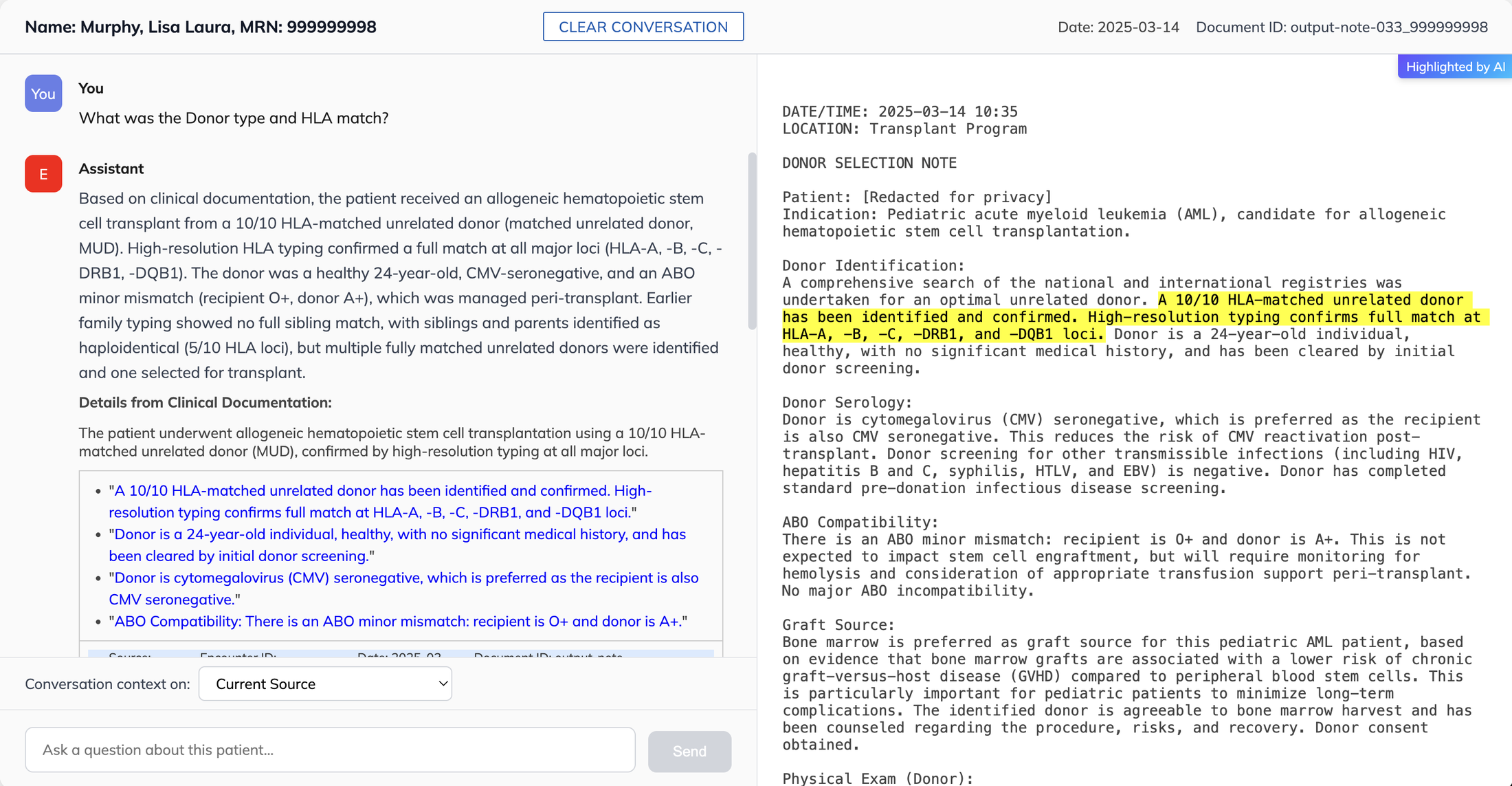
- 1Ask your question
- 2Read the answer
- 3Supporting quotations (click to jump to the source)
- 4Matching text, highlighted in the original note
What Can You Ask?
Real questions from Note Chat users, with identifying details removed
“Did the patient have post op arrhythmia or atrial fibrillation”
“find me information on his collagen mutation”
“Does this patient meet criteria for cancer of unknown primary or was a primary site identified?”
“I'm looking for any documentation regarding ESRD or a creatinine baseline. Pt had Cr 2.45 and I need to know if this is acute like a AKI or normal for the patient”
Highlights
What Note Chat does for you
Saves you time
Pulls the relevant details out of long patient records and gives you a clear, organized answer.
Every answer shows its source
Supporting quotations link straight to the original note, so you can check the context yourself.
Ask in your own words
Type a question the way you would say it, then follow up. If it needs more detail, it will ask.
Search as widely as you need
Point it at one note, one type of note such as radiology reports, or a patient’s whole chart.
Finds related terms for you
Looks for synonyms and related wording across large numbers of notes, and uses structured data such as diagnoses and procedures.
Secure & approved for PHI
Your notes stay in EMERSE. Only the excerpts needed to answer a question go to an OpenAI model in a private cloud environment under a University of Michigan agreement, approved for PHI. The model does not store or use your data.
Want the Full Tour?
Watch the extended walkthrough for a closer look at how Note Chat works within EMERSE.
Short on time? Start with the 48-second version at the top of this page.
Users Are Loving Note Chat
Users describe Note Chat as fast, useful, and easy to work with — helping them find relevant information, organize findings, and save time while reviewing patient charts.
“The chat feature has been producing exactly what I need…”
“Just gave the AI assistant a try with a case, and this is great. It got me to exactly what I needed in this scenario.”
“Awesome! I really like it. It summarizes what I am looking for in a succinct and organized manner.”
“The Note Chat feature is a fantastic idea, and I can see it being a game changer.”
“EMERSE Chat has proven to be fantastic.”
“I am starting to use the Note Chat option—loving it!”
“I am using the tool for myself now. It is awesome!”
Good to Know
What Note Chat covers today
One patient at a time
Note Chat is designed to work on one patient at a time. We are working on more flexible options for handling multiple patients.
Notes and key structured data
It reads clinical notes along with some structured data, such as diagnoses and procedures.
Labs
It does not currently read all lab results, but important results are often mentioned in the notes it does read.
Part of EMERSE, a Tool You Can Trust
Note Chat is built into the EMERSE search tool, an enterprise-grade system that has been continually refined for two decades with direct feedback from the people who use it.
Request Access to Note Chat
Contact the EMERSE team to get started.
Request accessor email EMERSE-team@umich.edu